
Saucy Sorcery manual
How to play, host your friends and build your sorcerer, with the game’s own screens.
In this manual
Getting started
You are a sorcerer on a hex arena that shrinks. Blast rivals with spells and shove them off the floor into the void. The last wizard standing wins the round, and the most rounds won takes the match.

Everything in the video is real gameplay from version 1.1.3, the next update.
Transcript: How to play Saucy Sorcery in three rules. Rule one, knockback beats damage. Shove your rivals off the floor into the void. Rule two, the floor fights back. Lava burns, ice makes you slide, and the safe zone shrinks every round. Rule three, between rounds, draft talents and build your wizard. Last wizard standing wins.
-
From the main menu choose Singleplayer, then Play. You play against bots, fully offline.

The main menu: Singleplayer, Multiplayer, Options. -
Set up the match, then pick your wizard. Each one shows its full kit of spells before you choose.

Choose your sorcerer: every wizard’s story, spell kit and signature spell (full game shown; the free demo has 4 wizards). -
Push, don’t just hit. A clean shove into the void knocks a rival out, however much health they have left.

-
Set up a match against bots Singleplayer > Play: pick 2 to 12 combatants, map size, difficulty, chaos and rounds, then choose your sorcerer (full game shown; the free demo has 4 wizards). -
Your first seconds in a round Health and XP top left, the minimap top right, your spells bottom right.


- Who plays
-
Between 2 and 12 wizards in a match, up to 8 of them people. Bots fill the empty seats.
- The free demo
-
Four wizards (Volta Vale, Mordecai Mourne, Orin Coldtide and Vivienne Vael) and everything else: every mode, arena and talent, bots, and play on your network or online. The full game adds all 32 wizards and every skin: on Android, one purchase in Google Play unlocks it, at the price Google Play shows in your country. It can’t be bought on a computer yet.
Install and first launch
Versions as of 18 November 2026: Saucy Sorcery runs on Android (Google Play, version 1.0.0) and on Linux (the free demo, version 1.1.2). More platforms are coming soon.
-
On Android, install it from Google Play. It needs Android 7.0 or newer.
-
On Linux, download the free demo: one AppImage of about 109 MB. Make the file executable and run it. Nothing to install.
-
Singleplayer offers a Tutorial until you finish it once, and How to Play is always there beside it.
- Linux
-
64-bit x86 (x86_64), glibc 2.28 or newer (Ubuntu 20.04, Debian 10, Fedora 29 and later), X11 or Wayland, a graphics driver with OpenGL 3.3, and PulseAudio, PipeWire or ALSA for sound.
- Android
-
Android 7.0 or newer, on 64-bit or 32-bit ARM.
- Internet
-
Online multiplayer needs it. Singleplayer and games on your own network do not.
Controls
Your wizard aims where you point, and every spell has its own cooldown on its button.
- Keyboard and mouse
-
Move with W A S D or the arrow keys and aim with the mouse. The left button fires your bolt, keys 1 to 6 cast your six spells toward the cursor, Space dashes and Esc pauses. Between rounds, right-click a talent to refund it.
- Gamepad
-
Left stick or D-pad to move, right stick to aim. A or the right trigger fires your bolt; X and Y cast spells 1 and 2, the bumpers 3 and 4, the left trigger 5 and a right-stick click 6. B dashes and Start pauses. The menus work with the pad too.
- Touch (Android)
-
The joystick bottom left moves you; turn on Dynamic Joystick in Settings to have it follow your thumb. The spell buttons sit bottom right: tap one to cast where you are walking, or press, drag and release to aim it. Tap anywhere else on the arena to fire your bolt. Dash and emote sit beside the spells; long-press a talent to refund it.
Host a game for friends
One player’s device runs the match and everyone else connects straight to it.
-
Choose Multiplayer, type your player name and choose Create Game.

-
Pick Online to play with friends anywhere, or Local network for friends on the same Wi-Fi.

-
Give the game a name, set players, map, difficulty, chaos and rounds, and choose Open lobby.

-
The lobby shows the join code with a Copy button. Send it to your friends. Online, the code holds your public IP address, so share it only with people you want to play with.

LAN: host a game (Multiplayer > Create Game > Local network) and share the join code shown at the top. The code and the address are blurred in this picture. -
Everyone picks a wizard and presses Ready, then you press Start match. You can add or remove bots, kick a player (press twice) or change the settings.

The host sees the friend join; both press Ready, then the host starts the match.
Join a friend’s game
Choose Multiplayer, type your name and choose Find Game. Then one of three ways in.
-
Type the code your friend sent, nine letters and digits like ABC-DEF-GHJ, and choose Join. Look-alike characters such as I, L, O, 0 and 1 are never used.

Your friend opens Multiplayer > Find Game and types the same join code (or picks your game from the local list). The code is blurred in this picture. -
Games on your own network appear in the list by themselves. Pick one, or Refresh to look again.
-
Or choose Direct IP (LAN) and type the host’s address and port. The port is 24545 unless the host changed it.
-
However you join, you land in the host’s lobby. Press Ready, then wait for the host to start the match.

The friend’s view: connected to the host and ready, waiting for the host to start.
Spells, levels and talents
Every wizard has a bolt of its element and six spells. Knockback is king: power comes from talents, not from damage alone.
-
The talent draft Between rounds, spend your talent points on one of the drafted cards (one reroll), then press Ready.

- Levels
-
Knockouts, assists, damage, staying alive and pickups give you XP, up to level 10. Every third round is a bonus round with 50% more XP.
- The talent draft
-
You start with one talent point and get one more each level. Between rounds you pick from six cards drawn from your wizard’s talent trees, with one free reroll a match. Go deep in one tree to reach its capstone, or spread out.

The talent draft: points to spend, six cards, one reroll. - Changed your mind?
-
Refund a talent for free between rounds: right-click it, press Y on a gamepad or long-press it on a phone.
- Soul Gems
-
Cosmetic only. They never change how strong you are.
Read the arena
Where a rival lands matters more than how hard you hit them.
-
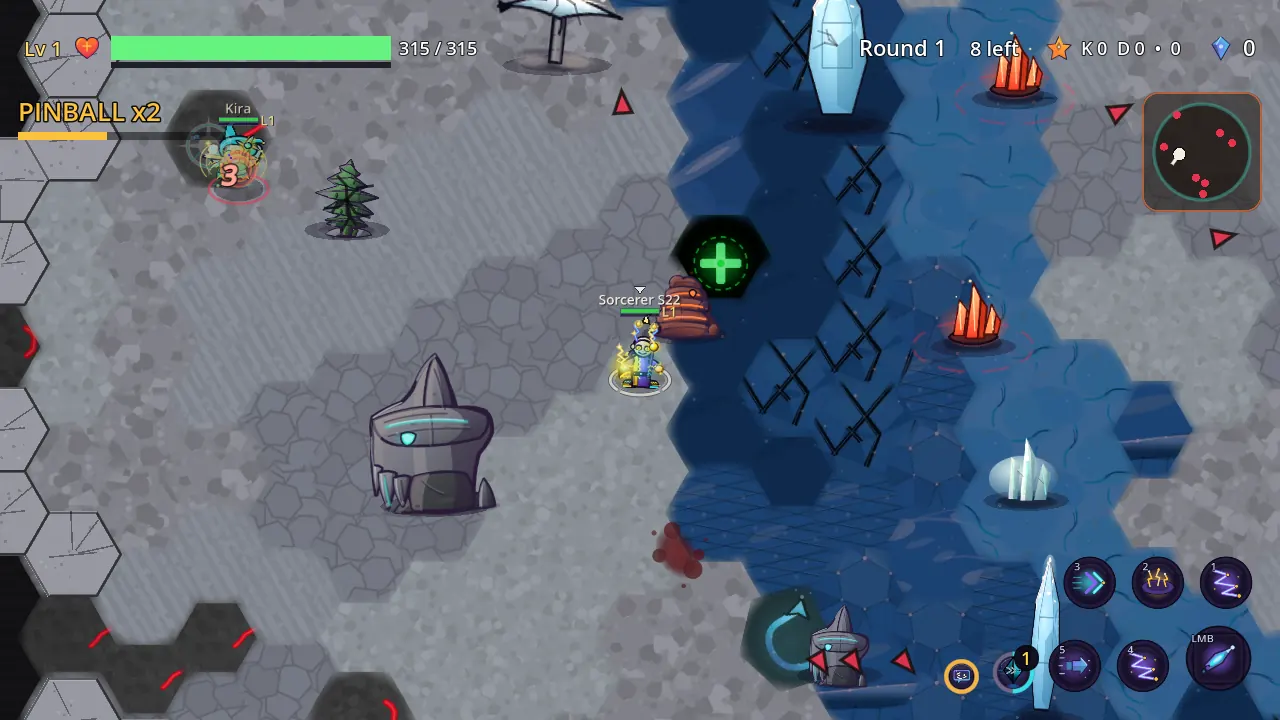
Tip: ice On ice you slide and your bolts fly 35% faster, so aim ahead of where you are going.

- The ground
-
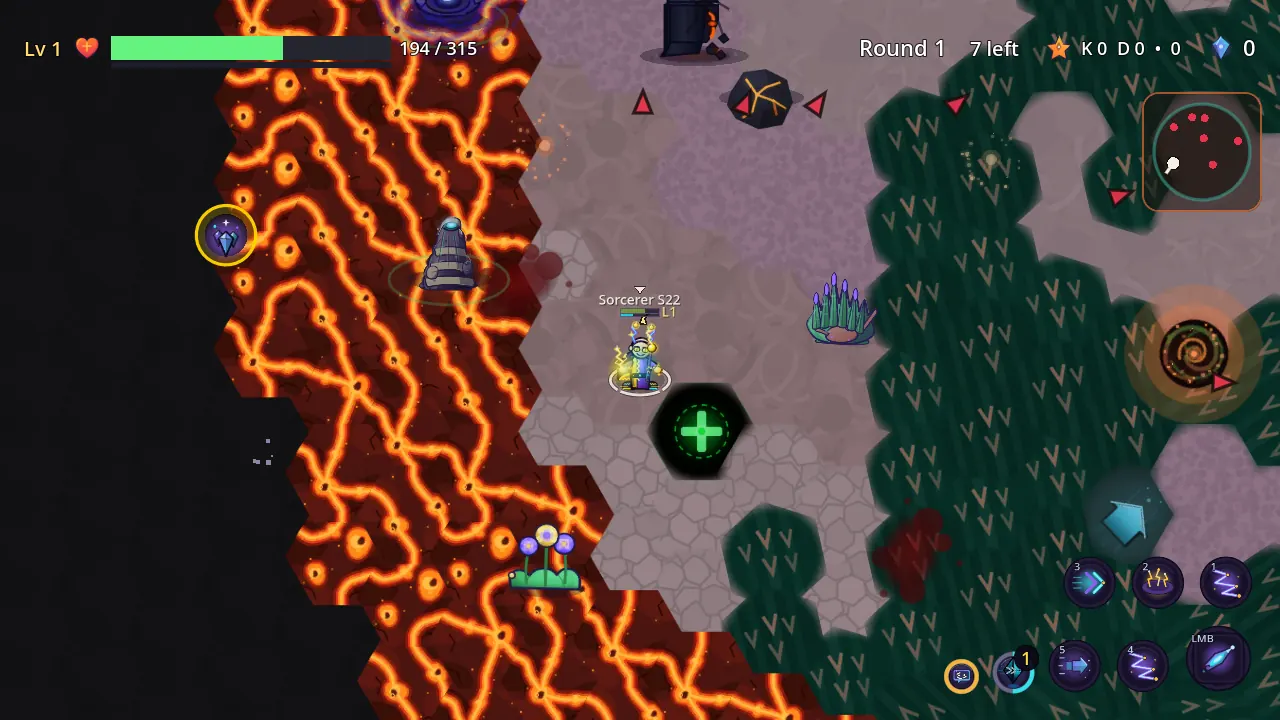
Ice makes you slide and fly farther. Mud slows spells crossing it. Bounce pads, currents and geysers move you, and glowing tiles such as lava and acid burn while you stand on them.
- The void and the shrinking floor
-
The void outside the floor hurts more the deeper you go: walk straight back to the centre. The safe zone shrinks every round, and in sudden death the rim crumbles inward.
- Arena extras
-
Dash lanes fling you along their arrows, heal shrines heal you once, bushes hide you until you cast, and harmless critters block a bolt.
- Events
-
From round 2, with Chaos set to Full, the arena can flood, drift, collapse hex by hex or turn to lava.

Settings
Two places: Options in the main menu, and Settings in the pause menu during a match.
-
Options and Credits From the main menu, open Options: display, audio and feedback settings, then the Credits (full game shown).

- Options
-
Display: overhead health and XP bars, Low Graphics (Potato Mode), and UI scale (Auto, 100%, 115% or 133%). Audio: music and sound effect volume, and Credits. Feedback: screen shake from 0 to 150%.

Options: overhead health bars, Potato Mode, UI scale, volumes, screen shake, purchases and your local data (full game shown). - Credits
-
Options > Credits names who made the music, the announcer voice and the sound effects, each with its licence.

Credits: music, announcer voice and sound effects with their licences. - Updates (Linux)
-
On the Linux demo, Options > Updates > "Check for updates automatically" is on by default. A few seconds after launch, and then at most once a day, the game asks updates.pineido.com whether a newer version exists; the request carries no cookies and no IDs. A newer signed version downloads in the background and installs when you choose "Restart to update" or quit. Turn the switch off to stop the checks. The Google Play version never checks: Google Play updates it.
- In a match
-
Pause, then Settings: music and sound volume, control sensitivity, aim assist, screen shake, Dynamic Joystick and UI scale, with Reset and Close.

- Match setup
-
Players from 2 to 12 counting bots; map size from Compact to Colossal, with a recommendation; difficulty Easy, Normal or Hard; and rounds 5, 10, 15 or 20.

- Chaos
-
Full turns everything on: events, hazards, props and surface combos. Classic keeps terrain, the shrinking floor and props, without events or volatile hazards. Duel is a flat arena with no props, where only the ring shrinks.
Troubleshooting and FAQ
- Friends cannot join online
-
The game asks your router to open UDP port 24545, and the lobby tells you in plain words if it could not. Forward that port to your device in the router, free it if another device already uses it, or put a provider modem in bridge mode. If your provider shares one address between many homes, let a friend host, or choose Play on LAN instead.
- The list of games stays empty
-
Games on your network use UDP 24545 for play and 24544 for finding each other. On Linux with a firewall, allow UDP 24544 to 24545 on the local network. You can always join by code or Direct IP.
- The AppImage will not start
-
If the AppImage won’t start on a system without FUSE, run it with --appimage-extract-and-run.
- It runs slowly
-
Turn on Low Graphics (Potato Mode) in Options. The game also lowers its own quality when frames stay slow, and restores it when they recover. A smaller map, fewer players, or Chaos set to Classic or Duel is lighter too.
- No sound
-
Check music and sound volume in Options or in the pause menu’s Settings. On Linux the sound goes through PulseAudio, PipeWire or ALSA: check the system mixer.
What happens if the host leaves?
In a local-network game another player takes over and the match goes on. In an online game, the match ends.
Where are my settings and progress?
On Linux, in ~/.local/share/godot/app_userdata/Saucy Sorcery/. The victory screen’s Share button saves a picture to the shares folder there.
Is there a Mac or iPhone version?
Not yet; coming soon.
Privacy
Singleplayer runs fully offline. In an online game your device connects straight to the host’s, with no game server in between, and the join code carries the host’s public IP address: share a code only with people you want to play with.
Contact
A bug, a question, or a wizard you want to see: write to us.

ByKostadin StambolievFounder and Imaginator
Pineido, based in Strumica, North Macedonia, is a software company that builds websites, online shops, web and mobile apps, business automation and AI for companies at home and abroad. Work ships in 30-day sprints at a fixed price, and the client owns the code.
Published Updated