
Kill the AI slop on LinkedIn. Keep the humans.
DeSlop is a Chrome extension that quietly hides, collapses, or dims AI-written posts in your LinkedIn feed. That way the people you actually follow stop drowning under bot-flavored thought-leadership.
It looks at the posts already on your screen and scores each one for the signs of AI writing. Then it filters the slop right where it sits. All of this happens inside your browser. There's no account to make and nothing to upload, and anything DeSlop does you can undo with one click.
Every feature is free. No account needed. Read the manual
For people who are done with the bots
LinkedIn used to be where you kept up with people you know. Now so much of the feed reads machine-made: the "I'm thrilled to announce" openers, the em-dash soliloquies, the broetry where every sentence gets its own lonely line, the "Agree? 👇" bait at the bottom. It all sounds the same because a lot of it came from the same handful of models, prompted by the same handful of "grow your personal brand" playbooks.
DeSlop is built for the people who find that exhausting. This isn't an anti-AI crusade, and it won't brand anyone a fraud. It just notices when a post carries the fingerprints of AI generation and engagement-farming, and it moves that post out of your way. Real people stay put, typos and awkward enthusiasm and all.
It runs on-device using a transparent, signal-based scorer: dozens of weak signals (AI vocabulary clusters, manufactured-authority numbers, rule-of-three cadence, lead-magnet CTAs, hollow profundity) that only add up to a hide when enough of them fire together. No single weak tell can bury a post, which is what keeps real writing safe.
Your LinkedIn feed fills with posts a chatbot wrote, and you read half of each one before you can tell.
DeSlop reads every post in your feed as it loads and weighs it against 54 signs of AI writing in six families and 11 signs of a human writing. It normally needs signs from two families. A chatbot’s leftovers, a strong platform pattern, phrases you taught it or an AI-made image label can be enough. On a post under 250 characters it usually only dims. It all runs in your browser, with no account and no network calls.
You already know these posts by heart
DeSlop is trained on the exact patterns that make a post read like a bot wrote it. When enough of them show up in one post, DeSlop steps in, and you decide whether it gets hidden outright or just dimmed.
“I'm thrilled to announce a pivotal new chapter…”
Humble-brag announcement hook“It's not about the tools. It's about the mindset.”
Manufactured antithesis“Everyone is talking about X. Almost no one understands Y.”
Everyone / few framing“Here is the hard truth nobody wants to tell you. 🧵”
Fake contrarian thread-bait“Comment "GROWTH" and I'll DM you the free playbook.”
Lead-magnet auto-DM funnel“In today's fast-paced, ever-evolving landscape…”
AI vocabulary cluster“Stop chasing motivation. Start building discipline.”
Broetry rule-of-three“I analyzed 1,000 top founders. Here are 7 lessons.”
Round-number authority flex
What it weighs, post by post
Every sign has its own weight and its own cap. A post is normally hidden only when signs from at least two families fire together. A chatbot’s leftovers, a strong platform pattern, phrases you taught it or an AI-made image label can be enough. A post under 250 characters is usually only dimmed.
54 signs of AI writing
Here in six kinds. Most are weak on their own; the score adds them up.
Chatbot leftovers
An AI talking about itself, assistant pleasantries, refusal boilerplate, a sycophantic opener, text pasted with the chat still attached.
Formatting carried over
Literal Markdown bold, headings, bullets and dividers, invisible characters, em-dash overuse, curly quotes.
AI phrasing
Clusters of AI vocabulary, “delve” and “tapestry”, puffed-up significance, hedges, the rule of three, “not X, but Y”.
LinkedIn bait
Humble-brag announcements, hot-take and contrarian hooks, engagement-bait and lead-magnet calls to action, hashtag stuffing, manufactured authority.
Stacked rhetoric
Antithesis after antithesis, anaphora runs, aphorism closers, the “everyone talks about X, few understand Y” frame.
Rhythm and layout
Broetry, one-line paragraphs, sentences all the same length, staccato fragments, emoji as bullets, bold on every keyword, ALL CAPS.
11 human signs that pull the score down
Each one counts for the writer. A post from before the AI era is left alone.
- Posted before the AI era
- Casual typing and typos
- Concrete first-person detail
- Mixed feelings
- Self-correction
- Slang
- @mentions
- Profanity or regional spelling
- Plain verbs
- Simple “is” and “has”
- Varied rhythm
Four quiet steps, entirely inside your browser
-
It reads what is already on your screen
DeSlop doesn't scrape or crawl anything in the background, and it makes no API calls. It only looks at the posts LinkedIn has already put in your feed, exactly as you see them.
-
It scores each post for AI-writing signals
A transparent, additive scorer weighs dozens of weak signals against human tells. Long posts are expanded off-screen first so the full text is judged, not just the two-line preview.
-
It hides, collapses, or dims the slop. You pick
Pick Lenient, Balanced, or Strict, and choose whether flagged posts vanish, collapse into a slim chip, or just fade back. Ads and your 1st-degree connections are left alone by default.
-
You stay in control and everything is reversible
Every filtered post opens in one click. The pill in the corner lists everything filtered this session and the signs behind each one. "Always show" and the author’s name trusts that person for good.
Your first five minutes with DeSlop
Six steps on the real extension, from install to a feed you control. Tap a screen to see it full size, or watch the short clips below.
-

Add it to Chrome
Its settings open once with a welcome note. Filtering is already on, and there is no account to make.
-

Open your feed
Posts that read as AI slop fold into a slim bar. Posts by people stay as they are, and a pill counts what was filtered.
-

Read any folded post
One click opens it where it stands. “Click to hide” on the thin bar above folds it again.
-

Choose how hard it filters
In the toolbar popup: Lenient, Balanced or Strict, or drag Filter hardness to any value.
-

Review what it filtered
The pill opens a list of every filtered post and why. “Always show” keeps a person’s posts in view for good.
-

Teach it
Every post’s three-dot menu gains “Add to slop” and “Not slop”. What DeSlop learns stays in your browser.
Watch it: short clips, no sound needed
-
Your first minute Install, the welcome note, and your feed with the slop folded away. -
Read a folded post Open one where it stands, then fold it again. -
Lenient, Balanced, Strict Watch one borderline post change as you move the setting. -
Review and trust people The pill, the list of filtered posts, and “Always show”. -
Teach it a post “Add to slop” from a post’s three-dot menu. -
Score any text Paste a post into Try it and see every sign that fired.


In your feed
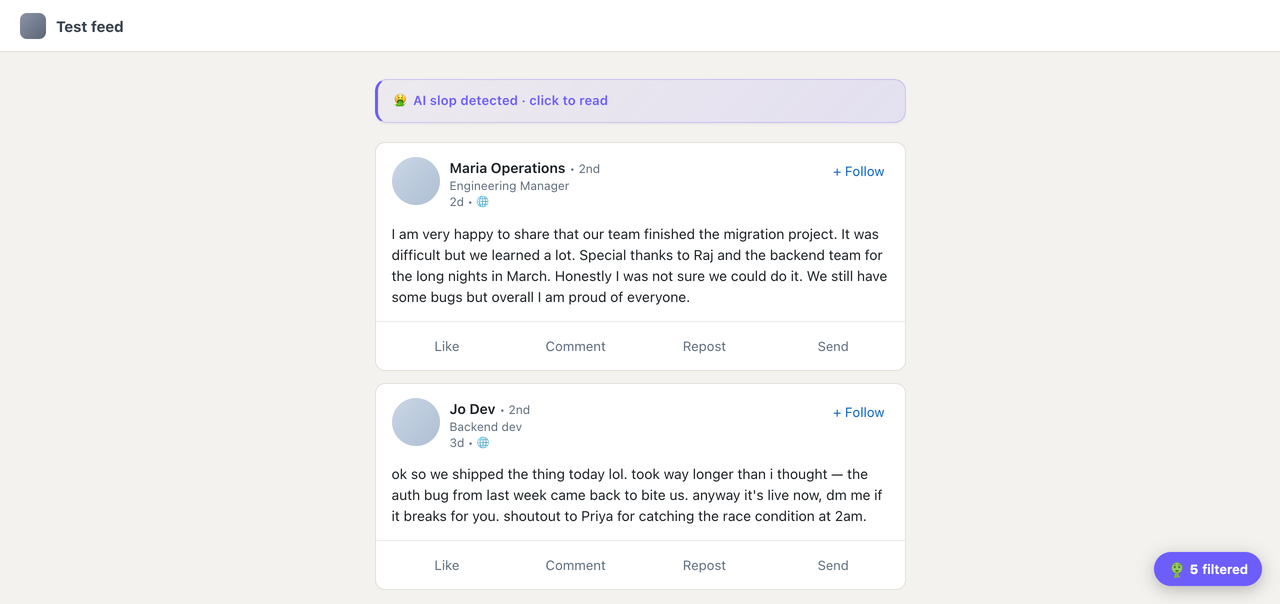
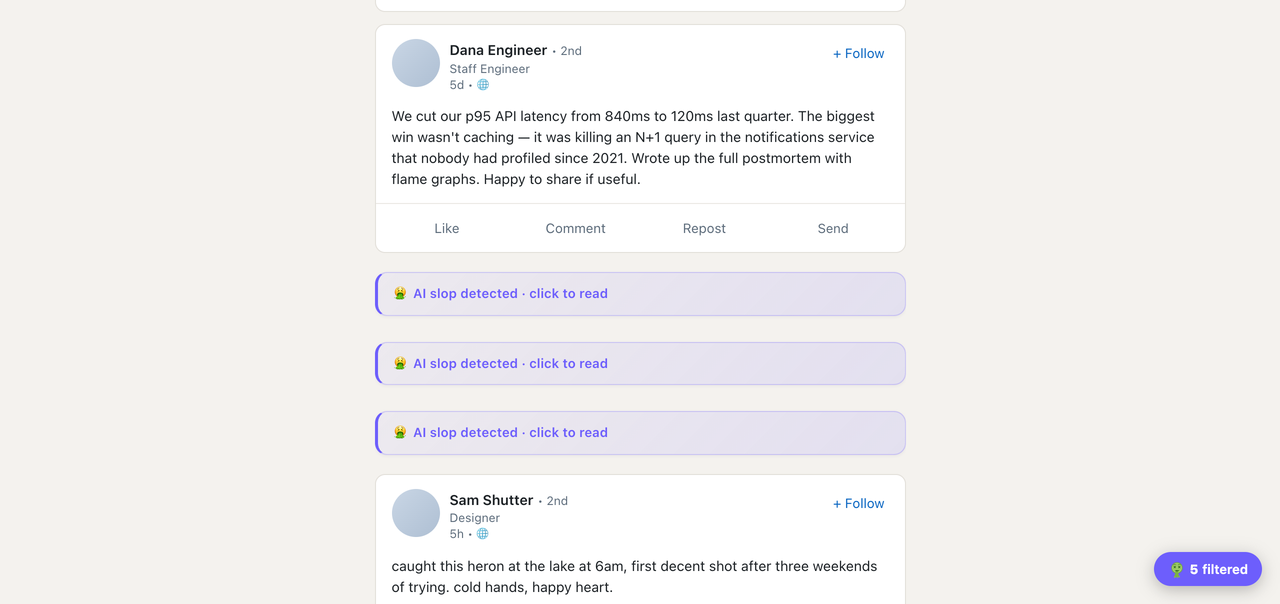
The extension at work, on our test feed built like LinkedIn’s.
Collapsed, not deleted
A post that reads as machine-made shrinks to a slim chip. One click opens it, so a mistake costs you nothing.
A person stays a person
A plain post by a human is left alone. DeSlop normally needs signs from two families. A chatbot’s leftovers, a strong platform pattern, phrases you taught it or an AI-made image label can be enough.
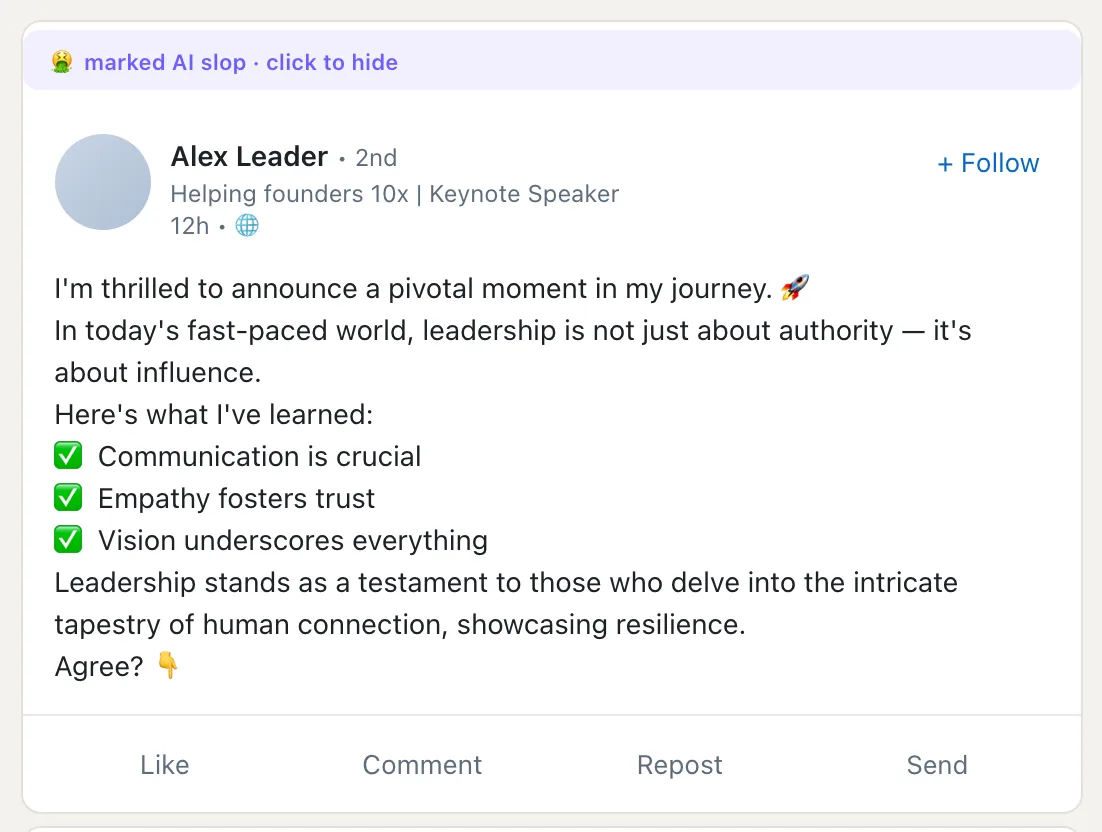
Read it where it stands
Click the bar and the post opens in your feed. Click the thin bar on top to fold it away again.
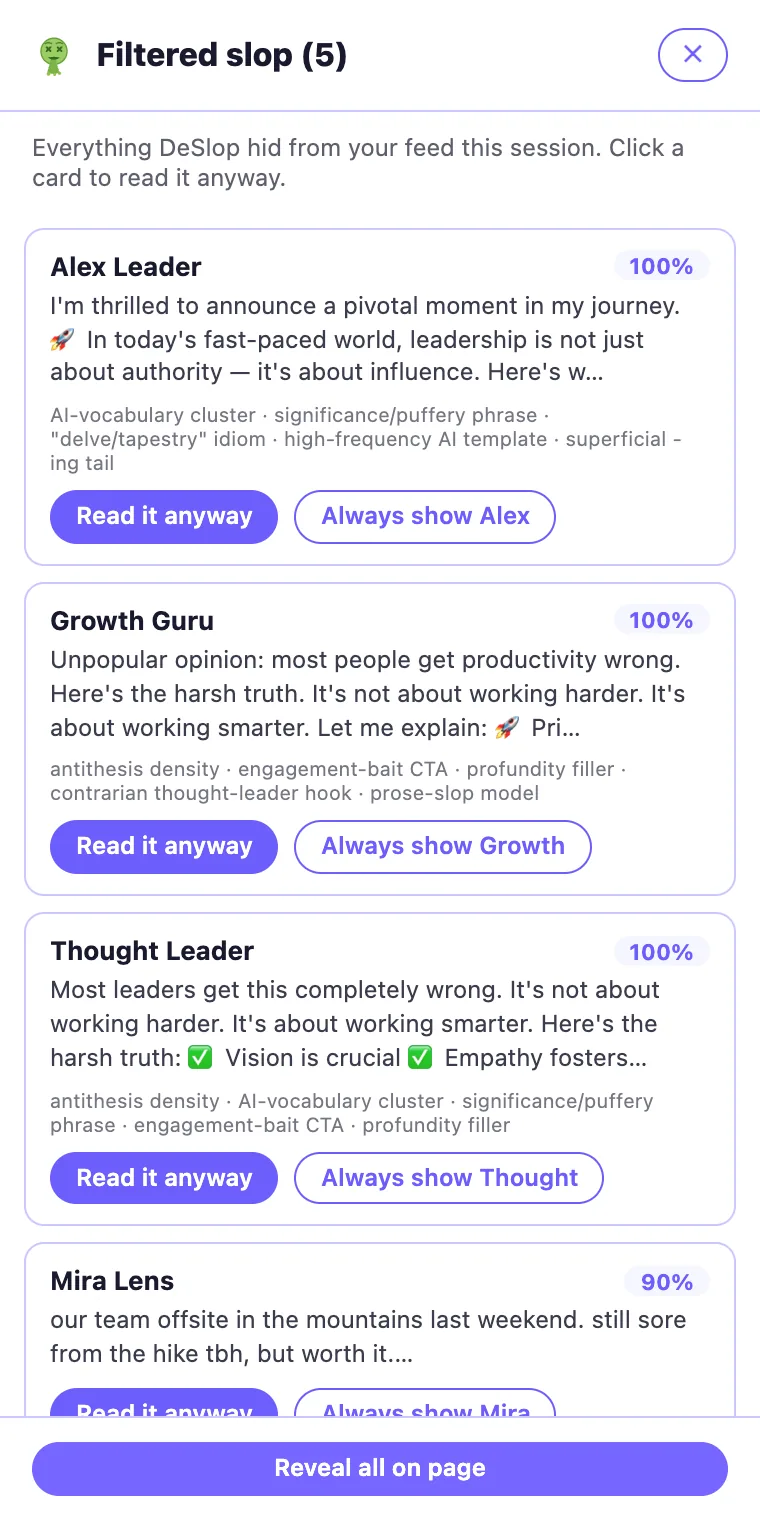
Every filter says why
The pill in the corner opens a list of everything filtered on the page: who wrote it, how sure DeSlop is, and the signs it found.
Trust a person for good
“Always show” puts the author on your list, and DeSlop never hides their posts again.
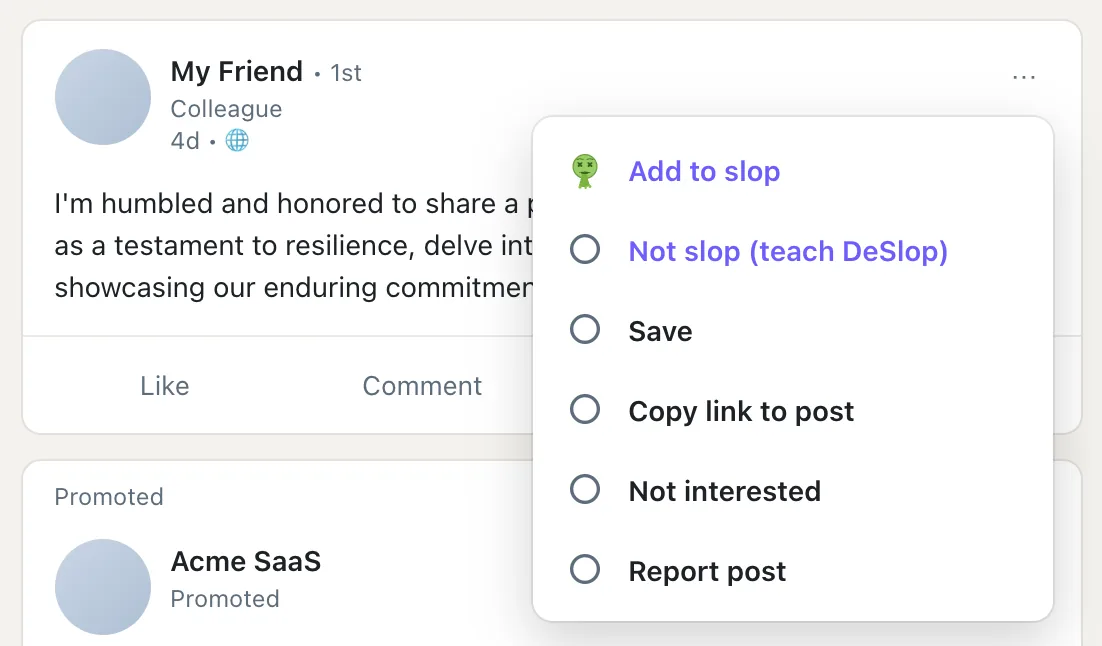
Teach it from the post’s menu
“Add to slop” for a post it missed, “Not slop” for one it got wrong. What it learns stays in your browser.
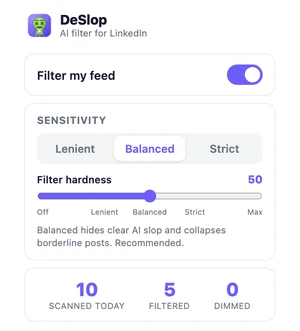
You set how hard it filters
Lenient, Balanced or Strict, and a slider in between. The feed changes as you move it.
Counted on your computer
Scanned, filtered and dimmed today, counted in your browser. Nothing is sent anywhere.
The top of the popup.
It hides AI slop and leaves real people alone
DeSlop has one aim above all the others: don't hide a real person. Normally, several independent slop signals have to line up before it acts. It also gives credit for human tells (typos, slang, first-person specifics, mixed feelings, self-correction), and it goes easy on short posts and non-native English so they don't get flagged by accident. When it's a close call, it leaves the post up.
No filter reads writing perfectly, so DeSlop is built to be corrected. Every filtered post shows the exact signals that fired plus a confidence score. One click reveals it anyway. One more click trusts that author for good, so their posts are never touched again. It also learns from your corrections, “Add to slop” and “Not slop” in a post’s menu, so your copy of DeSlop drifts toward your taste over time.
Explain every hide
Each filtered post lists its signals and a confidence score. No black box.
One-click undo
"Read it anyway" opens a post; "Always show" and the author’s name trusts that person permanently.
Human-safe by design
Needs multiple clustered signals to act, and protects typos, slang, and non-native English.
On-device AI judge
An optional local second-opinion model, built into Chrome, sanity-checks borderline posts. Nothing leaves your device.
Lenient, Balanced, Strict
A single slider tunes exactly how aggressive the filter is, live.
Flags AI-drafted DMs too
An optional, subtle "looks AI-drafted" hint on incoming messages. Read-only, never blocks sending.
Catches hidden AI fingerprints
Spots the leftovers AI tools leave in pasted text: invisible Unicode characters, chatbot citation residue, unfilled template placeholders.
Filters AI-made images
Hides posts whose image LinkedIn’s Content Credentials label as AI-made, or whose alt text says so. Camera-signed photos are never touched.
You never sign up or make an account, and nothing you do here leaves your browser.
DeSlop is not a data business. There is nothing to log into and nothing to harvest. Everything it does happens locally, on the page you are already looking at.
No signup, ever
There is no login, no email wall, no onboarding form. Install it and the filter just works, free.
No data collection
DeSlop does not collect, transmit, store, or sell your LinkedIn posts, messages, connections, or activity. What you read never leaves your device.
100% on-device
All scoring runs in your browser. The extension asks for two things only: local storage and access to your own LinkedIn tab. Nothing else.
Zero network calls
DeSlop makes no network requests at all. No license check, no analytics, no telemetry. It works exactly the same offline.
Free. Every feature, no catch.
DeSlop costs nothing and has no paid tier. Every feature is included, there is no account, and it makes no network requests.
- Every feature DeSlop Free Every feature. No account, nothing to buy.
- Full AI-slop filtering: hide, collapse, or dim
- Lenient / Balanced / Strict sensitivity
- The signs behind every filter + one-click undo
- Always-show list of people it never hides
- Train DeSlop on your own taste ("Add to slop")
- Hidden AI-fingerprint scan
- Filters posts with AI-made images
- On-device AI judge, DM hints, focus mode, per-signal tuning
- 100% on-device, no signup, no network requests
No paid tier, no subscription, no ads. DeSlop has nothing to buy and nothing to unlock. If it ever stops being useful to you, just remove it.
Frequently asked questions
What exactly is DeSlop?
A filter for your LinkedIn feed that lives in your browser. It finds the posts that read as machine-made and moves them out of your way. Posts by real people, ads and your connections are left alone.
Is DeSlop free?
Yes, completely, and every feature is included: AI-slop filtering at every sensitivity, explanations and undo, the always-show list, personal training, the hidden-fingerprint scan, AI-made image filtering, the on-device AI judge, DM hints, focus mode and per-signal tuning. There is no paid tier, no subscription and nothing to buy.
Do I need an account? What data do you collect?
No account: there is nothing to sign up for. And none: DeSlop makes no network requests at all, so what you read stays in your browser.
Can it hide posts with AI-generated images?
Yes, when the image says so. If LinkedIn shows Content Credentials on an image and they name an AI tool or say the image was AI-generated, or the poster’s alt text says it is AI-generated, DeSlop filters the post. A photo signed by a camera is never filtered. Invisible watermarks such as SynthID cannot be read on your device, so an AI image with no label is not caught. You can turn this off in the options.
Will it hide real people by mistake?
That is the failure it is built to avoid. It normally needs several signals together, though some strong ones can be enough, and when it is unsure it leaves the post up. If it still gets one wrong, one click shows the post and one more trusts that author for good.
How do I use it once installed?
Install it, open LinkedIn, and start scrolling. That is all it takes, and slop gets filtered automatically. Click the toolbar icon to switch between Lenient, Balanced, and Strict, or to turn it off. A filtered post folds into a slim "AI slop detected, click to read" bar; click it to read the post. The "filtered" pill in the corner lists everything filtered on the page, with the signs that fired, "Read it anyway", and "Always show" for its author, so you never miss a post you actually wanted.
Is this affiliated with LinkedIn? Is it allowed?
No. DeSlop is an independent product from Pineido and is not affiliated with, endorsed by, or sponsored by LinkedIn Corporation. It is a personal, client-side content filter: it only changes how posts already loaded in your own browser are displayed to you. It does not scrape, automate actions, or send LinkedIn any data.
Which browsers does it work on?
It works on any Chromium-based browser, including Chrome, Edge, Brave, Arc, and Opera. It is a Manifest V3 extension. A Firefox build may follow.
Read the Terms of Service, Privacy Policy, and License. DeSlop is an independent product and is not affiliated with, endorsed by, or sponsored by LinkedIn Corporation.
Install DeSlop and see the humans again
Adding it takes one click. Every feature is free.

ByKostadin StambolievFounder and Imaginator
Pineido, based in Strumica, North Macedonia, is a software company that builds websites, online shops, web and mobile apps, business automation and AI for companies at home and abroad. Work ships in 30-day sprints at a fixed price, and the client owns the code.
Published Updated